About the chargers
The EV4EU chargers are research chargers run by DTU Wind and Energy Systems, at DTU Risø (building 330) and Campus Bornholm. They are used to study smart charging: when you tell the system how much energy you need and when you leave, it can spread the charging over the time your car is parked.
Charging is free. Instead of money, sessions cost flexibility credits from a weekly allowance – the more flexible your request, the cheaper it is.
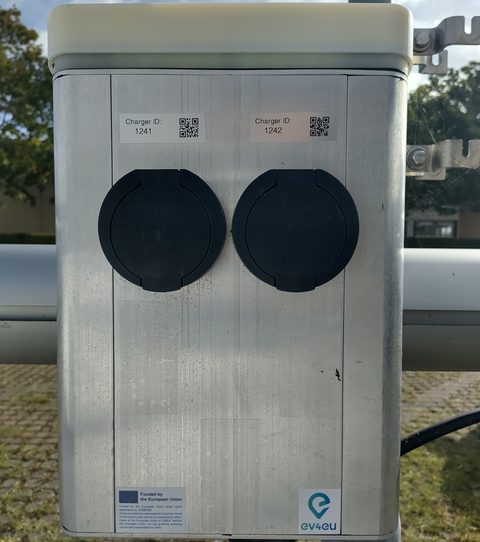
At building 330 there are also black wall-mounted AHEAD chargers. Those use a different app – see the AHEAD guide. Where the chargers are: parking & site layout.
First time
- Open the EV4EU app on your phone. You can add it to your home screen (Share → Add to Home Screen on iPhone, or the browser menu on Android) – it then opens like a normal app.
- Sign up once with your name and email and accept the data terms (what we store). The phone stays signed in; on a new phone or after clearing the browser you sign up again.
- Your vehicles (license plate and battery size) are remembered after your first session, on all your signed-in devices.
Charging step by step
- Plug in your car at a free EV4EU outlet.
- Charger (EVSE): pick the number written on the outlet. Chargers with a car plugged in but no session yet are listed first and marked · connected – usually that is yours. Chargers already in a session are not listed.
- Vehicle: pick a saved vehicle, or add one with its license plate and battery size (kWh, see your car's documentation).
- Departure: slide to when you expect to leave (in 15-minute steps, up to 24 hours ahead).
- Current battery level: what your car shows now.
- Desired battery level: where you want to be when you leave. It cannot be set higher than what the charger can deliver before your departure (at most 11 kW) – the reachable range is shown in blue on the slider.
- Check the price box (see credits) and press Start charging session. The charger receives your request; charging may start right away or later, depending on how the controller plans it before your departure.
Flexibility credits
Every week you have 100 credits. A new week starts on Monday at 00:00 (Danish time) with exactly 100 again – unused credits do not carry over.
What a session costs
The price per kWh depends on the average power needed to deliver your request before you leave: the energy you ask for divided by the time you are parked.
| Average power needed | Price |
|---|---|
| 1 kW or less | 1 credit/kWh |
| 6 kW | 5.5 credits/kWh |
| 11 kW (charger maximum) | 10 credits/kWh |
In between, the price rises in a straight line. So you pay less by asking for less energy or by staying longer.
Example
A 60 kWh car parked 8 hours, charging from 60 % to 80 %, needs about 13.3 kWh at an average of 1.7 kW: about 1.6 credits/kWh, so about 21 credits. The same request with a departure in 2 hours needs 6.7 kW: about 6.1 credits/kWh, so about 81 credits.
Reserved first, billed for what you get
- When you start a session, the full estimated cost is reserved from your balance.
- When the session ends, you are billed only for the energy actually charged (at the price you were quoted, and never for more than you asked for). The rest of the reservation is returned.
- If your balance can't cover the estimate, the app tells you – lower the desired level or move the departure later.
- Your balance is shown at the top of the app, e.g. 78.4 / 100 credits.
Your sessions
Under Previous sessions in the app you see each session with its charger, vehicle, battery levels, energy requested and charged, planned departure and credits. Status:
- Waiting to start
- Submitted; no energy has flowed yet.
- Charging
- Energy is being delivered (it may pause while the controller spreads it out).
- Ended
- The charger has stopped the session; the time it stopped is shown, and the credits are final. A session that never started counts as ended a day after its planned departure, and costs nothing.
- Status unknown
- The charging system couldn't be reached right now – try Refresh later.
Credits marked (reserved) are not final until the session has ended.
Tips
- Be honest about your departure. A later departure is cheaper because it gives the system room to plan – but if you leave earlier, you may not get the energy you asked for.
- Top up a little, often. Small daily sessions over a full working day are much cheaper than filling up in a hurry.
- Single-phase cars charge at most 3.7 or 7.4 kW, less than the charger's 11 kW. Your car may not reach the desired level if the departure is close – you only pay for what you actually get.
- Above about 80 % most cars charge more slowly, so very high targets in a short time may not be reached.
Your data
- Stored at DTU: your name and email (to contact you about your sessions), your vehicles' license plates and battery sizes, and your sessions (charger, battery levels, energy, times, credits).
- Personal details are deleted after a period without use (currently 12 months) or right away on request. Session data is kept for research, without your name, email or license plate.
- The charging system (operated with an external partner) only receives an anonymous id, the charger, the energy requested and your departure time – never your name, email or license plate.
- On your phone: one sign-in cookie, plus a local copy of your name, vehicles and app settings so the app opens quickly.
Troubleshooting
- My charger isn't in the list
- It already has a session running, or the charging system can't be reached. Check the number on the outlet, unplug and plug in again, or use another free outlet.
- The app asks me to sign up again
- The phone's sign-in was cleared (new phone, cleared browser data). Sign up again with the same email.
- "You're offline"
- The session is kept on your phone and sent automatically when you're back online. If the departure has passed by then, it is dropped – start a new session.
- "Not enough credits"
- Lower the desired battery level or choose a later departure. The balance resets Monday 00:00.
- Something else
- Contact the EV4EU team at DTU Wind and Energy Systems: klape@dtu.dk.